

Compare
Codex vs Claude Code
How Codex and Claude Code are set up, what matters when you build alone or with a small team, and how to keep one repo working with both.
| Setting | Codex | Claude Code |
|---|---|---|
| Made by | OpenAI | Anthropic |
| Source | CLI open source, Apache-2.0 | Closed source |
| Instructions file | AGENTS.md | CLAUDE.md; AGENTS.md fallback when no CLAUDE.md or CLAUDE.local.md loads |
| Skills folder | .agents/skills/ | .claude/skills/ |
| Run a skill | $skill-name | /skill-name |
| MCP servers | [mcp_servers] in config.toml | .mcp.json or ~/.claude.json |
| Hooks | hooks.json or [hooks] in config.toml | hooks in settings.json |
| Custom subagents | TOML files in .codex/agents/ | Markdown files in .claude/agents/ |
| Sandbox | On by default | Opt-in with /sandbox or settings |
| Plan mode | /plan | Shift+Tab, or /plan before a prompt |
| Resume a session | codex resume | claude --resume |
Checked against the Codex and Claude Code docs on 30 September 2026.
AGENTS.md and CLAUDE.md
Both load Markdown files of standing instructions. Put build commands and project conventions there.
Codex
Codex reads AGENTS.md. It starts with ~/.codex/AGENTS.md, then reads one in each folder from the repo root down to where you're working, so the closest file is read last. An AGENTS.override.md is read instead of the AGENTS.md next to it. Codex stops at 32 KiB unless you raise project_doc_max_bytes.
Claude Code
Claude Code reads CLAUDE.md in the folder you start in and every folder above it, ~/.claude/CLAUDE.md for you, and CLAUDE.local.md for notes you don't commit. Since v2.1.277 it also reads AGENTS.md, but only when no CLAUDE.md or CLAUDE.local.md loads from the working folder or its parents. This fallback requires the built-in agents-md plugin to be enabled. Add a CLAUDE.local.md to a repo that runs on AGENTS.md and Claude Code stops reading the AGENTS.md. To keep both, set Project instructions to claude-md-and-agents-md in /config.
If you use both
Keep one AGENTS.md. Give Claude Code a CLAUDE.md that starts with @AGENTS.md and holds only what is specific to Claude. Or go the other way and add CLAUDE.md to project_doc_fallback_filenames in ~/.codex/config.toml.
Skills
A skill is a folder with a SKILL.md that tells the agent how to do one job. Both support the open Agent Skills format. The instructions can be shared, but scripts, tool names and paths still need to work in each tool.
Codex
Codex looks in .agents/skills/ in every folder from the one you're in up to the repo root, then in ~/.agents/skills/. Type $ and the skill's name to run it, or /skills to pick from a list. Codex also picks a skill on its own when your request matches the skill's description.
Claude Code
Claude Code looks in .claude/skills/ in the project and ~/.claude/skills/ for you. The skill's name becomes a slash command, so a skill called deploy runs as /deploy. Claude Code adds its own frontmatter fields to the standard, for things like who may invoke a skill and whether it runs in a subagent.
If you use both
Neither tool reads the other's folder. Keep your skills in one and symlink the other to it. Stick to the six fields in the standard, name, description, license, compatibility, metadata and allowed-tools, for portable frontmatter. Check the body and any scripts for tool-specific dependencies before you use the skill in both.
MCP servers
Both support stdio and HTTP MCP servers. They keep the list in different files, in different formats.
Codex
Codex keeps servers in TOML, one [mcp_servers.<name>] table each, in ~/.codex/config.toml. A trusted project can have its own in .codex/config.toml. codex mcp add writes the entry for you. Codex supports stdio and streamable HTTP servers, and signs in to servers that use OAuth.
Claude Code
Claude Code keeps servers in JSON. .mcp.json in the repo is shared with your team, and ~/.claude.json is yours. claude mcp add writes the entry for you. Claude Code supports stdio, HTTP, SSE and WebSocket servers.
If you use both
You add each server twice, once in TOML and once in JSON. Both codex mcp add and claude mcp add take the command that starts the server after --, so that part is the same line for both.
Hooks
Hooks run your own scripts at set points, such as before a tool call or when a turn ends. The tools share several event names and parts of the JSON format, but their hook support is not identical.
Codex
Codex reads hooks from hooks.json or a [hooks] table in config.toml, in ~/.codex/ or the repo's .codex/. It asks you to review and trust a hook before it runs. There are 12 events, including PreToolUse, PostToolUse, SessionStart and Stop.
Claude Code
Claude Code reads hooks from the hooks key in ~/.claude/settings.json or the repo's .claude/settings.json. It has over 30 events to Codex's 12, including ones for worktrees, model switches, file changes and settings changes.
If you use both
Move command hooks one at a time and test their input and blocking behavior. Codex does not run Claude Code prompt or agent hook handlers. Check scripts that read a file path. Codex makes file edits with apply_patch, and the hook gets the patch in tool_input.command instead of a path. Matchers on Edit or Write still fire.
Subagents
Both can hand part of a task to a subagent that works in its own context and reports back. Both let you define your own.
Codex
Codex ships default, worker and explorer. Yours go in .codex/agents/ or ~/.codex/agents/ as TOML files. Each file is a full config layer, so a subagent can have its own model and sandbox. Codex starts subagents when you ask, or when a project or skill instruction tells it to.
Claude Code
Claude Code ships Explore, Plan and a general-purpose subagent. Yours go in .claude/agents/ or ~/.claude/agents/ as Markdown files with frontmatter. Claude Code hands work to a subagent on its own when the task matches the subagent's description.
If you use both
Subagent files don't carry over, since one is TOML and the other Markdown. If you want Codex to split work up the way Claude Code does, say so in the prompt or in AGENTS.md.
Permissions and the sandbox
Permissions decide which actions need approval. The sandbox limits what commands can access. These are separate controls. The defaults below describe the standalone tools; Longwave applies its own harness configuration.
Codex
Local Codex uses an OS sandbox by default. In workspace-write mode, commands can write inside your workspace, with command network access off unless enabled. That restriction does not itself disable hosted web search or MCP connections. The approval policy decides when it stops to ask, for example to write outside the workspace or to reach the network. Change it with /permissions, or start with --sandbox read-only to plan without edits. Codex also supports auto-review for eligible approval requests; routine actions inside the sandbox do not need that review.
Claude Code
Since v2.1.283, new interactive terminal and VS Code sessions default to auto mode unless your settings override it. A second model reviews actions that need classifier approval; some actions skip that review. The permission mode decides who approves what. The modes are default, which the app calls Manual, acceptEdits, plan, auto, dontAsk and bypassPermissions, and Shift+Tab cycles through the common ones. Its OS sandbox covers Bash commands and is opt-in through /sandbox or settings on supported platforms. When a command fails in the sandbox, Claude can retry it outside unless you set allowUnsandboxedCommands to false.
If you use both
Codex enables command isolation by default. In Claude Code, enable /sandbox, choose Manual mode if you want to approve actions yourself, and set allowUnsandboxedCommands to false. Set failIfUnavailable to true if commands must never run without the sandbox. The controls are not identical.
Plan mode and sessions
Both can plan before touching files, and both keep past sessions so you can pick one up later.
Codex
/plan puts the chat in plan mode, and Codex proposes a plan before it changes anything. codex resume reopens a session, and --last picks the latest one in this folder. codex fork copies a session into a new chat so you can try another approach.
Claude Code
Plan mode is one of the permission modes. Press Shift+Tab until the status bar says plan mode is on, or start a single prompt with /plan. claude --continue reopens the last conversation in the folder, claude --resume opens a picker, and /resume switches from inside a session. Add --fork-session to either to branch into a new session.
If you use both
Sessions stay with the tool that made them. You can't resume a Codex session in Claude Code. Before you switch tools halfway through a task, ask the first one to write down where it got to.
Which one should you use?
We believe you should use both. The best thing to do is to start with the $20 plan for each and get a sense of which models have what strengths. You will find that Anthropic's Claude models are often better at tasteful work such as frontend design and motion graphics while OpenAI's GPT models are very good at being diligent and following instructions. Every few weeks the frontier moves and the best models at the Pareto frontier change. This makes it almost a necessity for builders that are building at the frontier to have both the subscriptions. As your product and company grows, consider scaling up your Claude and Codex subscriptions as well to do more ambitious things more efficiently.
Run both in one app
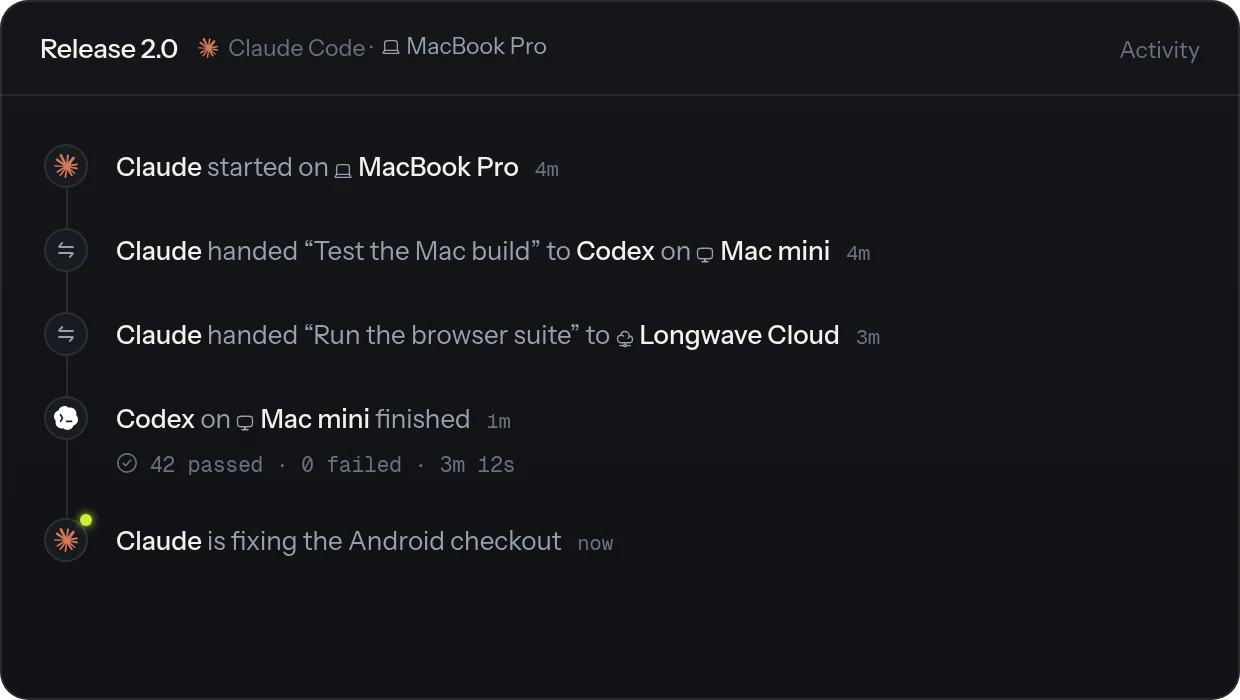
Longwave runs Codex and Claude Code in one app, on the subscriptions you already have. Choose the harness when you start a thread.
MCP servers you add in Longwave are available on both, passed to each harness in the format it reads. Longwave also shows the usage windows each harness reports, including 5-hour and weekly limits when available.
Questions people ask
Is Codex better than Claude Code?
Neither wins at everything, and the answer moves with each model release. Local Codex enables command sandboxing by default and has an open-source CLI. Claude Code has more hook events and hands work to subagents without being asked.
Does Claude Code read AGENTS.md?
Yes, since v2.1.277, with the built-in agents-md plugin enabled and no CLAUDE.md or CLAUDE.local.md loading from your working folder or its parents. To have it read both, set Project instructions to claude-md-and-agents-md in /config, or start your CLAUDE.md with @AGENTS.md.
Does Codex read CLAUDE.md?
Not by default. Add CLAUDE.md to project_doc_fallback_filenames in ~/.codex/config.toml and restart Codex.
Can Codex use Claude Code skills?
Yes. Both follow the Agent Skills format. Put the skill in .agents/skills/ or symlink it there from .claude/skills/, and use standard frontmatter. Check that any scripts, paths and tool references also work in Codex.
Do Claude Code hooks work in Codex?
Some command hooks can be adapted. Codex shares several event names and JSON conventions, but does not run Claude Code prompt or agent hook handlers. Test each event and its blocking behavior. Edit hooks receive an apply_patch command rather than the same file-path input.
Is Codex open source?
The Codex CLI is open source under Apache-2.0. Claude Code is closed source.
Can I use Codex and Claude Code together?
Yes. Keep one AGENTS.md and one skills folder, and add your MCP servers to both. Longwave runs both in one app and lets you choose the harness for each thread.
Run Codex and Claude Code in one app.
Start a thread on Codex or Claude Code from the same app, on the machines you already have.