Build beyond your reach
Longwave is the operating system for agent-run companies. Run a large number of distributed agents across multiple machines, harnesses and use cases.
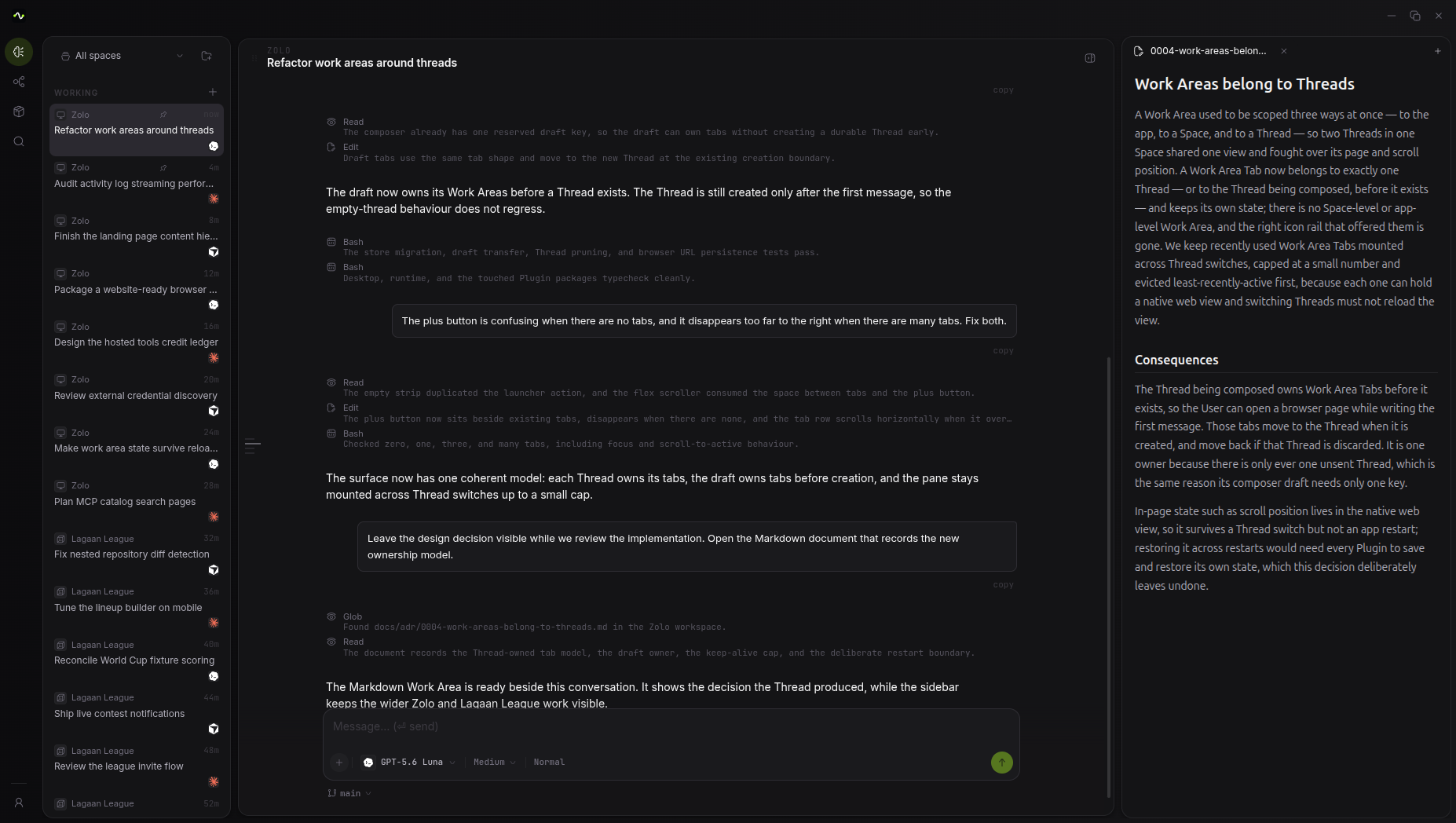
- Runs on
- Machines you own and cloud you rent
- Harnesses
- Claude Code, Codex, Cursor, OpenCode
- Extends via
- Plugins, workflows, and custom interfaces
- Records
- Every change, with the reason attached
One agent is easy. Forty is a different problem.
Chat windows are built for one agent on one machine. Scale past that and you are left coordinating terminals, redoing integrations, and reconstructing what changed from a transcript. Longwave runs the fleet: machines, accounts, and a record of what changed.
Every machine you have, working at once.
Longwave places agents across the boxes you own and the cloud you rent.
-
Work where the files already are
Local by default. Agents use the folders, tools and machine you already have, without uploading the workspace to run.
-
Put every machine you own on the job
The laptop, the workstation, the box in the cupboard. Place a run on whichever machine fits, from the same workspace.
-
Cloud when your devices cannot
Schedules and long runs keep going on hosted capacity while machines are asleep or offline. The local workspace stays where it is.
Bring agent harnesses that you already use.
Each thread runs on one harness. You can run several threads at once, each on a different harness, in the same workspace, on the same accounts, with the same record underneath.
-
 Claude Code
 -
 Codex
Codex -
 Cursor
 -
 OpenCode
And more coming soon
-
 Gemini
 -
 Kimi Code
 -
 Grok Code
 -
 Qwen Code
Shape the system to your work without waiting on a roadmap.
Tools, account connectors, work areas, custom views and workflows are plugins. What your business does differently is something you can compose within Longwave.
-
Tools and skills
Define what the agent can do and how it should do it. Pack that setup once and reuse it across runs.
-
Work areas
A panel beside the thread that shows the live state of the work, such as a design canvas or a running application, so people and agents are looking at the same thing.
-
Custom views
Full-screen surfaces for standing records across the workspace, such as an application analytics dashboard or a customer management interface, so you can get better visibility into your business data.
-
Workflows
Turn a job you already know how to run into something that fires on a schedule or an event, with a trail of completed runs.
Same system. Different work.
One runtime, one record and one set of accounts. Point them at software, marketing, design, research, sales and the rest.
-
Software development
Build web apps, mobile apps, games, APIs and the infra under them, from a first cut through something you can ship.
-
Design
Take screens, brand systems and product UI from exploration through to a finished design in the workspace.
-
Research
Run deep research across sources and keep a living brief: competitors, markets, papers, whatever you need to stay current on.
-
Sales
Research accounts, draft outreach and prep for the next meeting in more depth, faster.
Every change is recoverable before it is published.
Longwave checkpoints the workstream as agents go. You review, restore and publish on your terms, including documents and other space files alongside code.
-
Snapshots as the work happens
Every change an agent makes is captured automatically. Compare, restore or continue from any point before anything is published.
-
A lane per body of work
Each workstream is its own line off the project base. Several agents can run in parallel and stay out of each other's files until you bring the lanes together.
-
Publish what you mean to keep
Snapshots stay private until you choose what lands in Git and on the PR. Intermediate steps stay recoverable; the shared history stays curated.
Connect the tools you already use. As many accounts as you want.
-
 GitHub
 -
 Instagram
 -
 LinkedIn
 -
 Vercel
 -
 Supabase
 -
 Reddit
and many more
One workspace for people and agents together.
Pass work back and forth, stay in the same context, and keep a trail of the work.
-
Agents as members
Each agent has its own identity in the workspace, with access you grant, same as a person on the team.
-
Manage spend across the team
Token budgets for people and agents in one place. Cap usage, watch burn, keep the workspace inside what you meant to spend.
-
A trail of the work
See who did what across people and agents, under which instruction, with whose sign-off.
More agents. Less coordination.
Longwave gives you one place to run different harnesses, track each change, move work across machines and review the evidence.
You can add agents without becoming the coordination layer. Each agent starts from the work that already exists, with the history needed to continue.
That gives solo founders and small teams more capacity without adding more coordination work. Longwave manages the growing complexity, so you can focus on decisions that need your attention.
Questions people ask
What is an AI agent orchestration platform?
An AI agent orchestration platform is the system that puts your AI agents to work. Your agents run on the machines you already own, each on the harness you pick: Claude Code, Codex, Cursor and more. They use the tools and accounts your team already has. You can point them at development, marketing, sales or research. Plugins shape the system to how your business runs.
Can you self-host AI agents?
Yes. Self-hosted agents run on your own machines, work offline, and leave your files as ordinary files on disk. That is the default in Longwave. Agents run on every machine you add, from your laptop to the box in the cupboard, and scheduled work keeps going in the cloud while your devices are asleep.
How do you run multiple AI agents at the same time?
You split the job into workstreams and give one to each agent. A workstream is a private, fully set up copy of the project for that one agent, so parallel agents never get in each other's way. Longwave spreads the agents across all of your machines, so your everyday workstation stays cool while the rest carry the load. Agents can also run long-running dynamic workflows, or loops, within a single workstream or across many. A loop pushes through large volumes of work until the job is done. Longwave gives you one interface across all the workstreams on all your machines.
What is the difference between an AI agent platform and an agent framework?
A framework is a library you write agent logic in, such as LangChain or CrewAI. A platform is what runs that logic: the machines, the schedules, the permissions, the accounts and the record of what happened. Most teams need both.
What is the best version control system for AI agents?
Git and GitHub, as they exist today, were built for people committing a few times a day. Point a fleet of agents at them and they slow down or fall over. Longwave hosts your code on infrastructure that stays fast under agent load and adds an interface on top of git designed for running many agents in parallel. It is fully compatible with git.
How can I use Claude Code, Codex and Cursor from the same application?
You run them side by side in Longwave. Each tool connects as a harness, and each thread you start runs on the harness you pick: Claude Code, Codex, Cursor, OpenCode or Gemini, alongside Longwave's own. Every thread works in the same workspace, uses the same accounts, and lands in the same record. So you can give marketing to one harness and code to another and follow both in one place.
How do I monitor multiple AI agents working in parallel?
You follow them all from one view. Longwave lists every agent, run, workflow and loop on every machine you own, with its status, its cost and the instruction it is working from. Whether you run four agents or forty, the picture stays one screen wide. Anything that needs your attention comes to the top.
Are AI agents ready for production work?
Yes, the models are ready. They already carry real work in production today. What is usually missing sits around them: machines to run on, permissions you set, credentials kept out of prompts, and a record you can audit after a night of unattended work. Longwave supplies those parts.
Start with one machine. Tonight.
Run your first agent where you sit, then spread the work across every machine you own. It keeps going while you sleep.